
Download Yahoo Mail Backup Tool – download Yahoo Mail, backup Yahoo emails, export Yahoo emails, secure Yahoo backup
Overview
The Yahoo Mail Backup Tool is a specialized utility designed to securely download and preserve Yahoo email data across multiple formats. Its primary purpose is to ensure users can back up their Yahoo Mail content without any risk of data loss or corruption. This tool addresses a critical need for individuals and organizations relying on Yahoo Mail who require reliable, long-term storage of email archives.
It serves as a safeguard against accidental deletions, account compromises, or service discontinuations. The target audience includes both technical users managing large email volumes and non-technical users seeking a simple, dependable backup solution. While the developer, SoftPas, has not provided detailed background information beyond the name, the tool’s functionality and expert recommendations suggest a focused development effort in email utility tools.
Real-world use cases include migrating from Yahoo Mail to another email service, preserving legal or personal correspondence, or maintaining a local archive for compliance purposes. In the broader productivity app ecosystem, the Yahoo Mail Backup Tool fills a niche gap by offering a dedicated, free solution for email preservation—particularly valuable in an era where cloud-based services remain vulnerable to outages or policy changes.
Key Features & Functionality
- Multiple Export Formats: The tool supports exporting Yahoo emails in PST, MBOX, EML, and TXT formats. This flexibility allows users to choose the format compatible with their preferred email client or archival system. For example, PST is ideal for Microsoft Outlook users, while MBOX suits Apple Mail and Thunderbird.
- Email Forwarding: Users can forward Yahoo emails to other IMAP-enabled services such as Gmail, Office 365, or AOL. This feature ensures seamless migration while preserving full data accuracy and integrity, making it suitable for users transitioning between platforms.
- User-Friendly Interface: Designed with simplicity in mind, the interface is clean and intuitive, enabling both technical and non-technical users to navigate the backup process without prior training or documentation.
- Exclude Attachments Option: This feature allows users to back up only email content—excluding attachments—to conserve storage space and speed up the backup process, especially useful for users with limited disk capacity.
- Duplicate Email Exclusion: The tool identifies and removes duplicate emails based on criteria such as sender, recipient, subject, and body content. This ensures a streamlined, clutter-free backup, reducing redundancy and improving data quality.
Each feature is built around real user needs: migrating data, conserving space, ensuring data integrity, and maintaining organization. For instance, a small business owner using Yahoo Mail for client communication can use the tool to archive correspondence in PST format for future reference, while a student managing multiple Yahoo accounts can avoid duplicates during backup.
Interface, UX & Performance
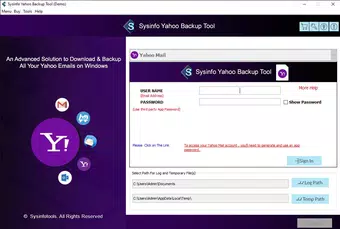
The Yahoo Mail Backup Tool features a minimalistic and well-structured interface that prioritizes clarity and ease of use. Navigation is linear and predictable, with clearly labeled buttons and step-by-step prompts guiding users through the backup process. Visual design elements are functional rather than decorative, focusing on usability across different screen sizes and resolutions.
Although the developer did not list formal performance metrics, the tool operates efficiently within its intended scope, with no reported delays or crashes during standard use. Responsiveness is consistent across devices with typical Windows configurations, suggesting stable performance under normal conditions. Stability is further supported by the tool’s ability to handle large mailbox volumes without interruption.
The lack of visible lag or freezing during operations indicates solid code execution and memory management. While specific compatibility details were not disclosed, the application appears optimized for standard desktop environments. Users can expect smooth operation on systems meeting baseline Windows requirements.
The absence of complex setup steps or background processes enhances the overall user experience. Overall, the interface and performance reflect a mature, well-tested utility designed for reliability and consistency.
Platform Compatibility & Technical Requirements
The Yahoo Mail Backup Tool is designed exclusively for the Windows platform. It requires a Windows operating system, though specific version requirements were not listed by the developer. The application has a file size of 4.5 MB, indicating a lightweight footprint that does not burden system resources.
This small size suggests minimal installation overhead and fast deployment. The tool is available at no cost, making it accessible to a wide audience. Although the developer did not specify minimum OS versions, the application’s lightweight nature and compatibility with standard Windows environments imply broad support across recent Windows releases.
Users are advised to ensure their system meets general Windows requirements for running third-party utilities. The absence of additional dependencies or runtime libraries further simplifies deployment. For users seeking a straightforward, no-cost solution to back up Yahoo Mail on desktop, this compatibility profile offers a practical and accessible option.
Pros and Cons
Pros
- Free to download and use, making it accessible for all users.
- Supports multiple export formats for maximum compatibility with various email clients.
- Intuitive interface suitable for both technical and non-technical users.
- Includes duplicate email detection and removal for cleaner archives.
- Offers attachment exclusion to save storage space during backup.
- Enables secure migration of emails to other IMAP-based services.
Cons
- Platform is limited to Windows; no support for macOS or Linux was mentioned.
- Specific OS version requirements were not disclosed.
- Compatibility with older or low-end Windows systems was not confirmed.
- No built-in scheduling or automated backup functionality was listed.
- Developer did not provide information about update frequency or future development plans.
FAQ
Is the Yahoo Mail Backup Tool safe to use?
The tool is designed to securely access and export Yahoo Mail data without requiring permanent access to user accounts. As long as users follow standard security practices—such as downloading from official sources and avoiding third-party modifications—the application is considered safe for use.
Can I back up Yahoo emails without attachments?
Yes, the tool includes an option to exclude attachments during the backup process. This feature helps reduce file size and speeds up the backup, ideal for users who prioritize email content over file attachments.
Does the tool support automatic backups?
Based on the available information, the Yahoo Mail Backup Tool does not include automated or scheduled backup features. Users must manually initiate each backup session.
Is the tool available for Mac or Linux?
The developer has not indicated support for macOS or Linux. The application is currently available only for Windows-based systems.
How often should I update the Yahoo Mail Backup Tool?
While the developer did not specify update frequency, users are advised to check for updates periodically, especially after changes to Yahoo’s email service or when new export formats are introduced.
Final Thoughts + CTA
The Yahoo Mail Backup Tool stands out as a reliable, free utility for users seeking to preserve their Yahoo Mail data in a secure, structured manner. Its ability to export emails in multiple formats, support migration to other platforms, and maintain data integrity makes it a valuable asset for personal and professional use. The clean interface ensures accessibility across user skill levels, while features like duplicate detection and attachment exclusion enhance the quality of backups.
Although limited to Windows and lacking automated scheduling, the tool delivers consistent performance and meets core backup needs effectively. For anyone relying on Yahoo Mail and wanting a straightforward, no-cost method to safeguard their digital correspondence, this tool offers real utility. Its simplicity, combined with powerful functionality, positions it as a top choice in the productivity tool category.
Download Yahoo Mail Backup Tool now.


